← back to features

Financial Management

Cut accounting time by 65% with automated finance workflows.

0%
Billing time saved
0%
Payment accuracy
0%
Automated invoicing

SERVICES

Streamline your services.

Schild allows you to easily define and change your services and rates, centrally. All changes are immediately reflected in the billing workflow-eliminating manual rate management.

BILLING

Accuracy with every invoice.

Whether a one-off or long-term client, with Schild you have automatically generated invoices that directly tie back to your service rates and completed ops. Your clients always have accurate invoices and know how much they were billed, for what, and when.

Payments

Financial insights at a glance.

Monitor your financial health without leaving Schild. With metrics built-in to each section of administration, you have the most complete picture of your organization, 24/7.
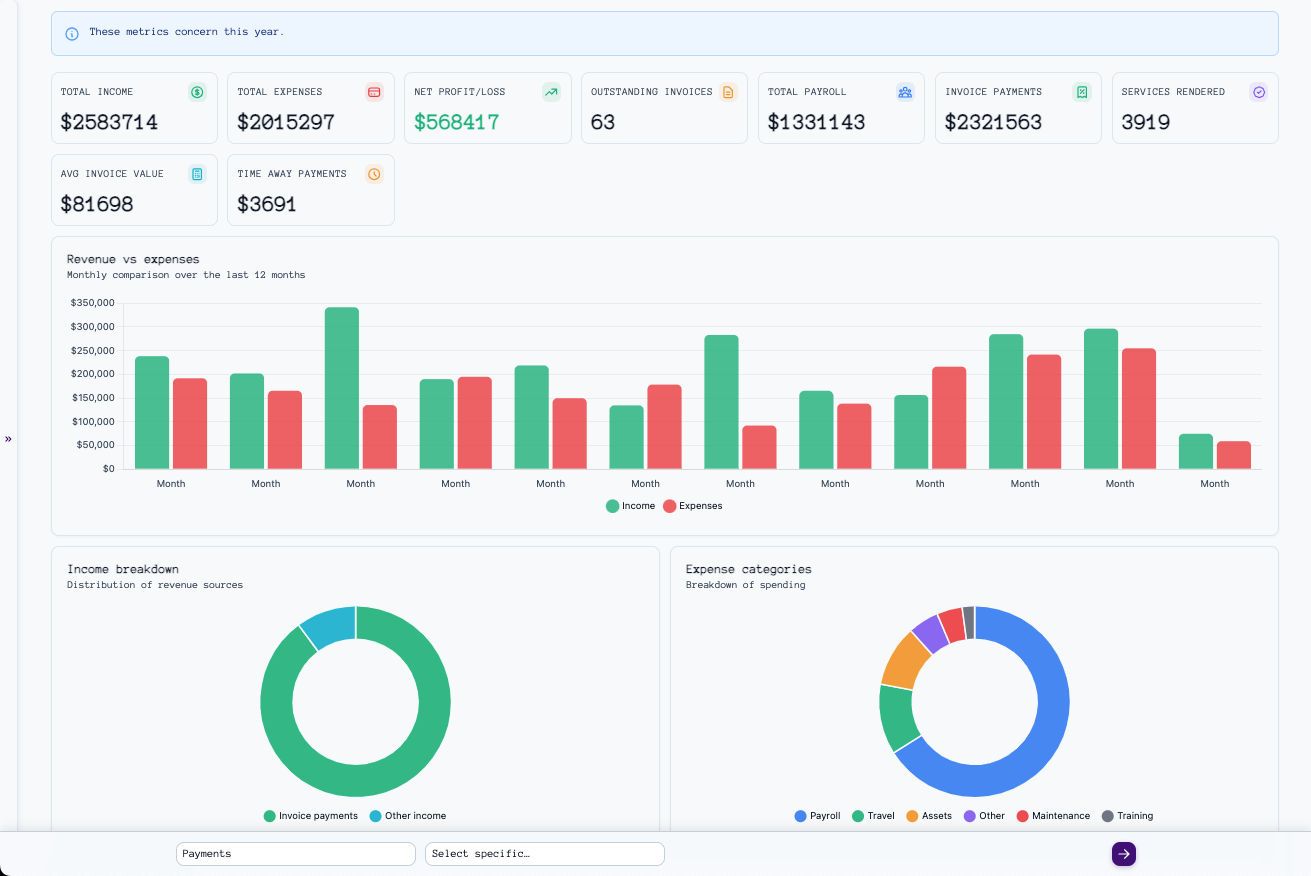
Financial insights

INCOME

Complete income visibility.

Record payments automatically from invoices or add them manually when needed. You can capture every essential detail—ensuring complete visibility into your revenue streams.

Recent Payments

Payment history

Recent Expenses

Expense history

EXPENSES

Document every dollar spent.

Record expenses as they happen—snap a photo of the receipt and categorize—whether it's new tablets or travel to meet clients, every expense is easily tracked.

Frequently asked questions

Common questions about financial management in Schild

You define your services and whether you charge hourly or a flat fee. Each service has a corresponding operation type. If you have an active service defined for a given operation type, when an operation of that type is completed, services rendered for the client are generated. Services rendered form line items on invoices.
Services rendered from completed operations form line items on invoices (see "How does service rate management work?"). Navigate to the "Services rendered" part of administration, select the services for a time period, select "Generate invoices…", and click or tap "Go". For each client you've rendered services for during that period, you'll have accurate invoices.
Schild is designed to track every revenue. When you receive payments from invoices, add the payments on the invoice in administration. Added payments automatically create income records. For every invoice, you have visibility into whether it remains outstanding or has been paid in full. If you receive income outside of Schild's operation workflow, you can manually add it.
Schild is designed to easily track every incurred expense. Navigate to "Expenses" in administration, describe the expense, select a category, and upload photos.
Schild supports service add-ons. When defining services, you can add add-ons, like additional fees for armed services. The amounts are automatically included on your invoices.
Yes. Schild supports service discounts. Service discounts are added separately from services, where you can specify parameters like the active period and whether the discount should be applied as a percentage of the subtotal or a flat reduction. Discounts are automatically applied at invoice generation.
Yes. Navigate to the invoice, and click or tap the "Send to Client" button.
Ready to automate your billing?
© 2026 Schild Technologies